
FFGL Plugins
Eight custom Resolume plugins, installed into Arena with one click.
Eight custom Resolume plugins, installed into Arena with one click.
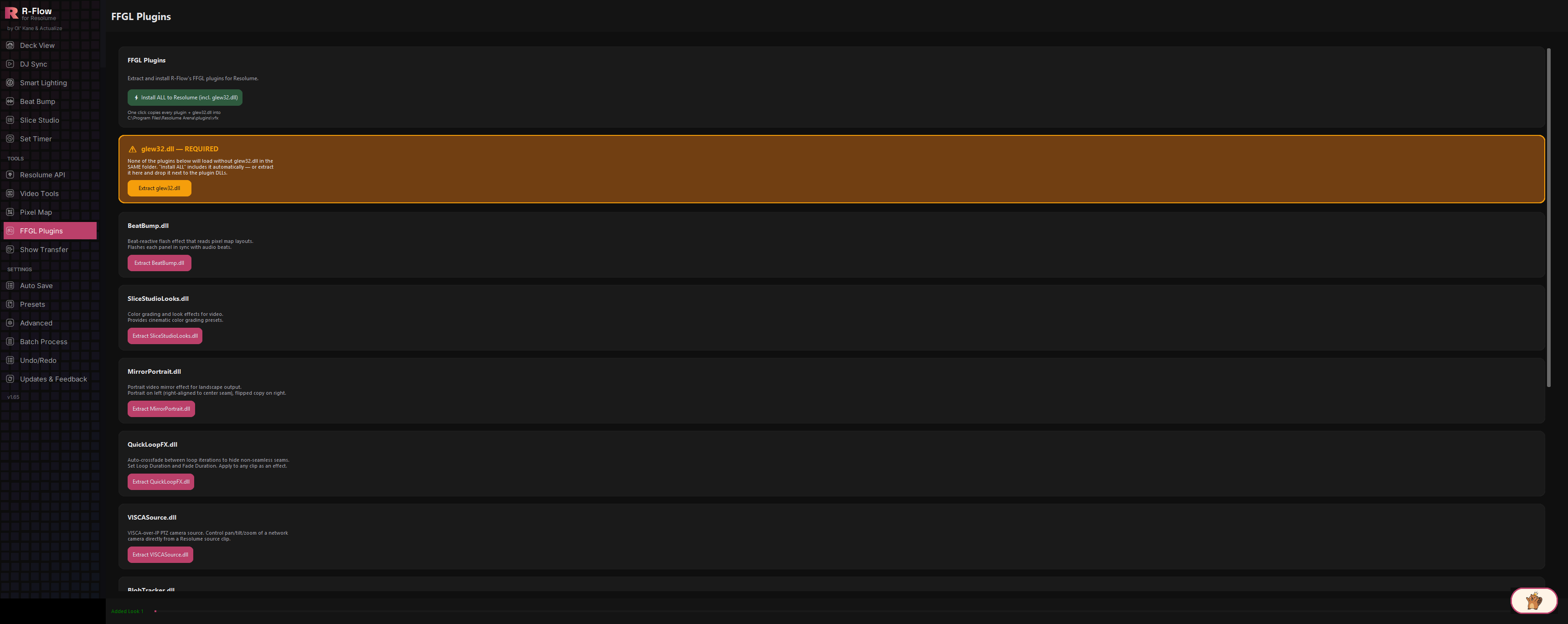
The FFGL Plugins app is R-Flow's built-in plugin installer. It bundles eight custom-built FFGL sources and effects for Resolume, from beat-reactive flashes and seamless loop crossfades to a YouTube URL source and a network PTZ camera source, and copies them straight into Resolume's plugin folder for you. It also handles the fiddly parts automatically: the shared graphics dependency every plugin needs, and the helper programs the YouTube Source relies on. Restart Resolume once, and everything shows up in your Sources and Effects panels.
The "Install ALL to Resolume" button copies every plugin plus the required shared graphics dependency directly into Resolume's plugins/vfx folder. If Resolume lives somewhere non-standard, a folder picker lets you point at the right spot.
Beat Bump (beat-synced panel flashes that read your pixel map layout), Slice Studio (the stage-mapping effect behind the Slice Studio app: 16 blendable Look sliders plus Scale, Zoom, Edge Feather, and Show Outlines), Mirror Portrait (portrait video mirrored across a center seam for landscape outputs), Quick Loop FX (auto-crossfades loop iterations to hide non-seamless seams), VISCA PTZ (an effect you drop on any clip: the video passes straight through while its Pan/Tilt/Zoom/Preset dials drive a network PTZ camera over VISCA-over-IP), Blob Tracker (real-time bright/dark/alpha blob detection with an animated cyber targeting HUD: glowing lock-on brackets or marching-ants frames, rotating reticles, scan sweeps and telemetry readouts), SVG Source (render scalable vector art as a source, with a built-in file browser), and YouTube Source (play a YouTube video URL as a source clip, with real-time WASAPI audio, Volume and AV Sync controls, Loop, Trim In/Out, and a Save-to-Disk downloader). Note some plugins register in Resolume under their display names: "Slice Studio", "VISCA PTZ", "Quick Loop", and "SVG Overlay".
The YouTube Source needs two helper programs (a downloader and a video decoder) to work. Dedicated buttons stage both into a local helper folder, and a one-click "Update yt-dlp only" button fetches the latest downloader whenever YouTube changes something and breaks playback.
A highlighted warning card explains that none of the plugins load without the shared graphics dependency in the same folder, and the all-in-one installer includes it automatically so you can't forget it.
Every plugin card has its own Extract button that opens a save dialog (pre-pointed at Resolume's plugin folder), so you can place individual plugins wherever you want, including on another machine via USB stick.
After installing, you get a checklist showing exactly which files succeeded and which failed, plus the fix for the most common failure (running R-Flow as Administrator).
In R-Flow, switch to the FFGL Plugins app. At the top you'll see a description card with the main install button, followed by a highlighted dependency warning and one card per plugin.
This is the easiest path. R-Flow copies all eight plugins plus the required glew32.dll dependency into Resolume's plugin folder (C:\Program Files\Resolume Arena\plugins\vfx by default). If Resolume isn't installed in the default location, a folder picker titled "Select Resolume plugins/vfx folder" appears. Browse to your Resolume installation's plugins/vfx folder and confirm.
A summary window lists every file that was copied with a checkmark, and flags any that failed. If you see "access denied" failures, close R-Flow and relaunch it as Administrator, then click Install ALL again. Resolume's folder lives inside Program Files, which Windows protects.
Resolume only scans for new plugins at startup. After a restart, the plugins appear in Resolume's Sources and Effects panels alongside the built-in ones. Drag them onto clips, layers, or the composition like any other source or effect.
The YouTube Source plugin needs two helper programs to fetch and decode video. On the YouTube Source card, click "Install/Update helpers (ffmpeg + yt-dlp)". R-Flow stages both into a local helper folder in your user profile (no Administrator rights needed) and reports what was installed. This also runs automatically whenever you install or extract the YouTube Source plugin. Then, in Resolume, add the YouTube source to a clip and paste a video link into its YouTube URL parameter.
Prefer manual control? Each plugin card has an "Extract" button that opens a save dialog, pre-pointed at Resolume's plugin folder, so you can save that one plugin anywhere you like. If you go manual, also click "Extract glew32.dll" on the warning card and save it into the same folder as the plugins; nothing loads without it.

YouTube changes its site regularly, which eventually breaks older downloader versions. On the YouTube Source card, click "Update yt-dlp only" to fetch the latest release and drop it into the helper folder. The download runs in the background so R-Flow stays responsive.
| Install ALL to Resolume (incl. glew32.dll) | One-click install: copies all eight plugins plus the required shared dependency into Resolume's plugins/vfx folder, then stages the YouTube helpers. |
|---|---|
| Extract glew32.dll | Saves the required shared dependency on its own, for manual installs. It must sit in the same folder as the plugins. |
| Extract (per plugin) | Each plugin card's Extract button opens a save dialog defaulting to Resolume's plugin folder, letting you place that single plugin wherever you choose. |
| Install/Update helpers (ffmpeg + yt-dlp) | Stages the two helper programs the YouTube Source needs into a per-user helper folder; reports each one as present, installed, or failed. |
| Update yt-dlp only | Force-downloads the newest YouTube downloader release: the fix when YouTube playback suddenly stops working. |