
Resolume API
Your whole Resolume composition in a browser: from the booth, from the back of the room, or from another city.
Your whole Resolume composition in a browser: from the booth, from the back of the room, or from another city.
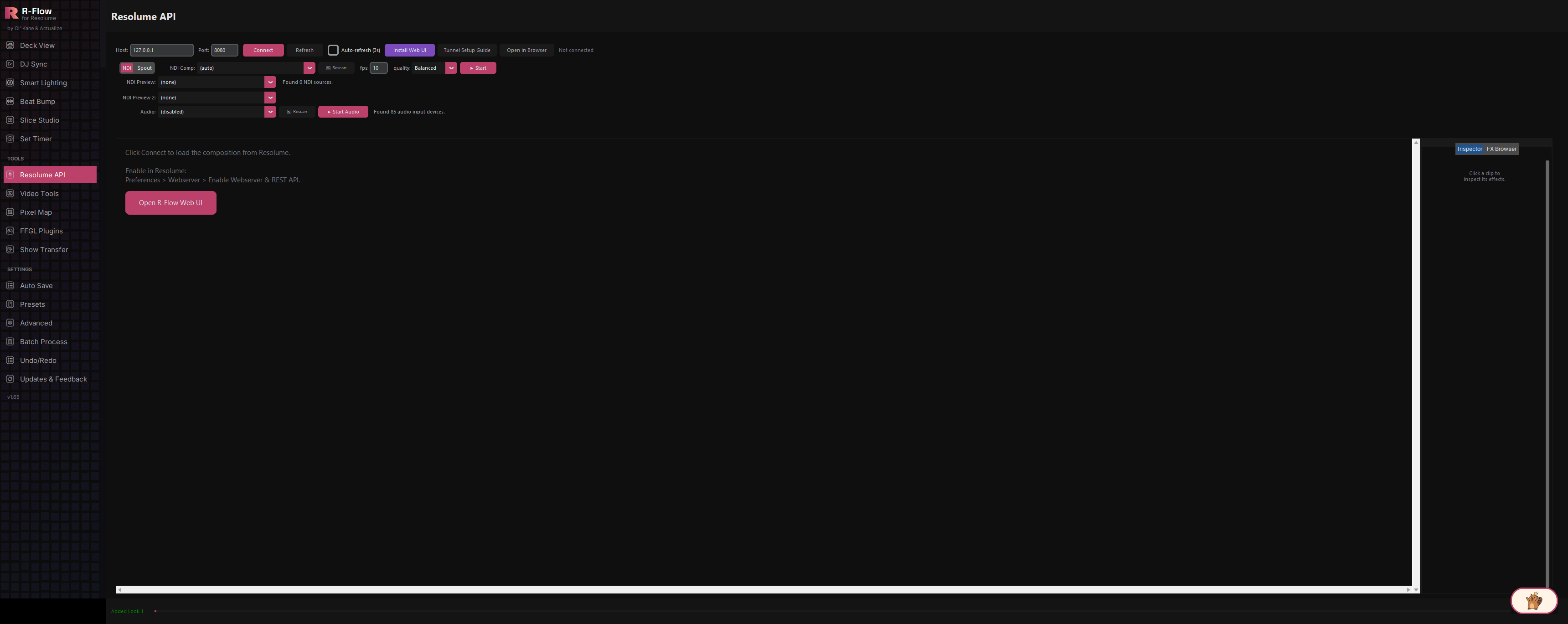
The Resolume API app connects R-Flow to Resolume Arena over its REST web API, then publishes a full browser interface for it. The app window itself stays deliberately small (connection settings, video monitors and audio) because the real work happens in the web UI: clips and decks with thumbnails, live video previews, effects, sticky notes and MIDI. That interface is reachable at your own private r-flow.io address from anywhere you are signed in, and you can share it with other R-Flow users to run a show together.
r-flow.io/u/<your name>/ reaches your machine over HTTPS from any network. It is tied to your R-Flow account, so signing in is the only key required: no port forwarding, no tunnel config, no static IP.
Grant other R-Flow users access to your link from your account page and revoke it just as fast. Useful for a VJ duo swapping control, or a tech helping you from front of house.
Decks and clips with thumbnails, click-to-trigger, effects with live parameters, sticky notes and MIDI, all rendered in the browser rather than cramped into a desktop panel.
A built-in MIDI bridge reads the mapping files you already made in Resolume (the same XMLs from its Shortcuts folder), so you don't remap anything. Pick a mapping and an input port on the R-Flow machine and start it from the browser: notes fire clips and columns, and CCs drive faders, knobs and tempo through Resolume's API. The last message received is shown live, so you can tell at a glance whether a controller is actually talking.
Pull your composition output plus up to two preview feeds into the web UI. NDI works across the network; Spout shares GPU textures on the same machine.
Stream any input device, including system audio via a loopback device, so remote monitoring tells you how the set actually sounds, not just how it looks.
The local link runs entirely on the venue's wifi with a private key, so the browser interface still works when the connection does not.
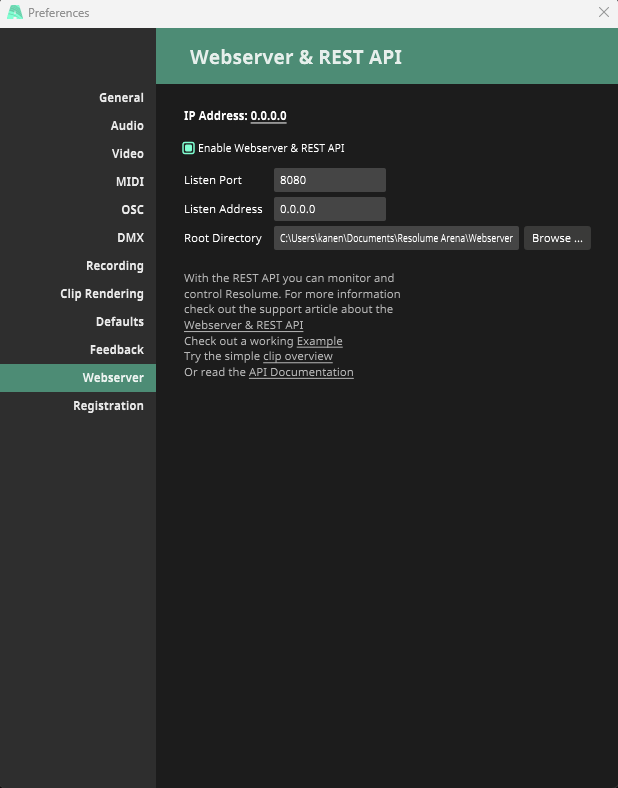
In Resolume Arena open Preferences (Ctrl+,) and pick Webserver in the left-hand list. Tick Enable Webserver & REST API, the switch at the top. Leave Listen Port on 8080 and Listen Address on 0.0.0.0 unless you have a reason to change them; those are the defaults R-Flow expects. 0.0.0.0 simply means accept connections on any network adapter, which is what lets R-Flow reach it. Resolume remembers the setting, so this is a one-time job per machine.
Your web UI address is tied to your account, so sign in from the Updates app (Account & License, then Sign In) if you have not already. This is what gives you a private link nobody else can open, and what lets you share it with people you choose.

In the Resolume API app enter the Host and Port of the machine running Resolume (127.0.0.1 and 8080 when it is the same computer) and click Connect. The status line turns green and reports the composition name along with its layer and column counts.

Choose NDI or Spout as the backend, then pick your composition source in the Comp dropdown; sources named with COMP are selected automatically. Add up to two preview feeds if you want them, set fps and quality, and click Start. These feeds are what appear in the browser.

In the Audio row pick an input device and click Start Audio. A system-audio loopback device is chosen automatically when one exists. The web UI then carries sound alongside the video, which is what makes remote monitoring genuinely useful.

Click Open R-Flow Web UI. It opens your own address, r-flow.io/u/<your name>/, which reaches this machine from anywhere over HTTPS and only for people signed in and allowed. This is the full interface: decks and clips with thumbnails, live monitors, effects, notes and MIDI.
Click a clip to trigger it, browse decks, watch the composition and preview monitors, add effects, and leave sticky notes for whoever is on next. Anything you do there lands in Resolume immediately. A phone works as well as a laptop.
On r-flow.io open your account page, find Your R-Flow link, and add another R-Flow user by username or email. They will see your rig under Shared with you and can open it just like you do. Remove access any time with one click. It takes effect immediately.
At a venue with no usable connection click Open on this network instead. That hands you a link on the local wifi containing a private key for your machine, so a phone or laptop on the same network still gets the whole interface with nothing but a router between you.
| Host / Port | Address of the machine running Resolume. Defaults to 127.0.0.1 port 8080 (this computer). |
|---|---|
| Auto-refresh (3s) | Re-reads the composition from Resolume every three seconds so the status stays current. |
| NDI / Spout backend | How the video monitors receive frames: NDI works across the network; Spout is GPU texture sharing on the same machine. |
| Comp / Preview / Preview 2 sources | Which video feeds to monitor. Sources containing COMP or PREVIEW are matched automatically. |
| fps | Monitor frame rate, 1 to 120 (default 10). Higher looks smoother but uses more bandwidth. |
| quality | Presets balancing sharpness against bandwidth. Drop to Smooth on cellular or busy venue wifi. |
| Audio device | The input streamed to the web UI. A system-audio loopback device is preferred automatically when present. |