
Smart Lighting
Turn every smart light in the room into a beat-synced rig: Hue, LIFX, Govee, Nanoleaf.
Turn every smart light in the room into a beat-synced rig: Hue, LIFX, Govee, Nanoleaf.
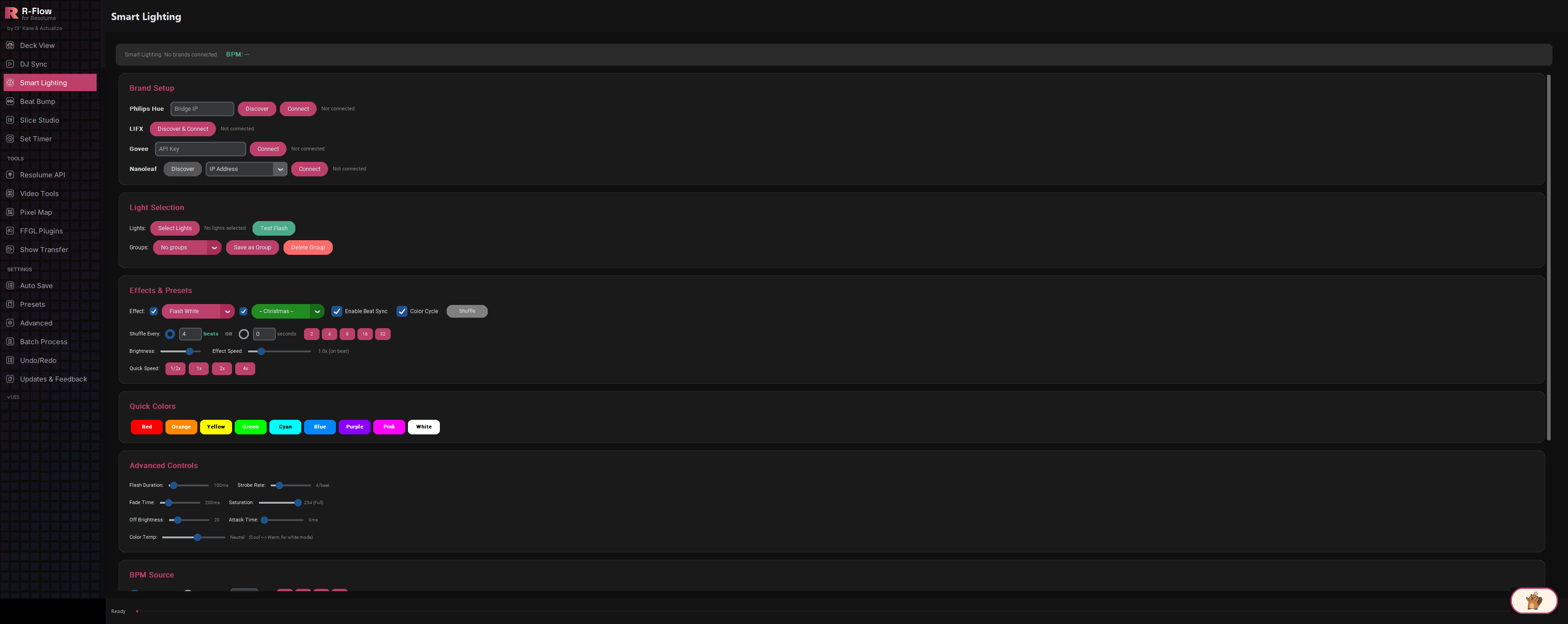
Smart Lighting turns consumer smart bulbs into a beat-reactive light show that runs alongside your visuals. Connect Philips Hue, LIFX, Govee, and Nanoleaf gear (all at the same time), pick your lights, choose from 35 built-in effect presets, and hit Start Beat Sync. The beat can come from your DJ gear automatically, from a manual BPM you type or tap in, or from live audio analysis of any audio input on your PC.
Connect Philips Hue (bridge auto-discovery), LIFX (one-click LAN discovery), Govee (cloud API key), and Nanoleaf (network discovery) simultaneously, and drive them all from a single set of controls. Saved connections reconnect automatically the next time you launch the app.
Twenty core effects (flashes, strobes, chases, waves, pulses, rainbow sweeps, Random Party and more), plus fifteen dedicated Christmas presets like Xmas Chase Red/Green, Xmas Twinkle Red/White, and Xmas Fireplace.
Auto mode looks for BPM from your connected DJ gear and offers to switch to Manual whenever no tempo is available, Manual mode takes a typed BPM (20-300) with quick buttons for 100/120/128/140, and Audio Input mode listens to any audio device on your PC and detects the beat live, with an on-screen BPM readout and beat pulse indicator.
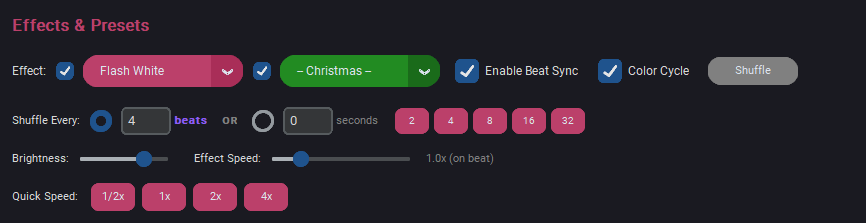
Let the app rotate through effects for you, every N beats (quick buttons for 2/4/8/16/32) or every N seconds. Checkboxes next to each preset list control whether the regular pool, the Christmas pool, or both are in rotation.
BLACKOUT and FREEZE toggle buttons, TAP TEMPO, beat division (1/1 to 1/8), downbeat sync, reverse direction, color lock, random color, and nine one-tap Quick Color buttons for instant room-wide color changes.
Gradient-capable lights show up in the picker with their individual segments, so chase and wave effects can travel across a single light strip, not just between fixtures.
Sliders for brightness, effect speed (0.25x-4x), flash duration, strobe rate, fade time, saturation, off brightness, attack time, and color temperature let you tune the look from subtle pulse to full-on strobe.
Save any selection of lights as a named group, recall it from a dropdown, and it persists between sessions. Handy for different rooms or venues.
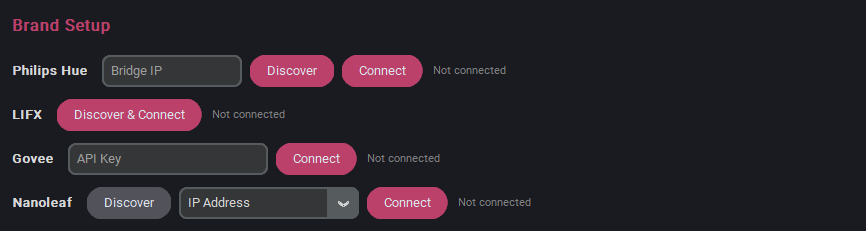
In the Brand Setup section, connect whichever brands you own. Philips Hue: click Discover to find your bridge (or type its IP into the Bridge IP field), then click Connect. On first connection you'll be prompted to press the physical button on the Hue bridge, then click Connect again. LIFX: click Discover & Connect and your LAN lights are found automatically. Govee: paste your API key into the API Key field and click Connect. Nanoleaf: click Discover (takes about 10 seconds), pick your device from the dropdown, and click Connect. First-time pairing requires holding the power button on the Nanoleaf device for 5-7 seconds.
Click Select Lights to open a picker showing every light from every connected brand. Gradient lights list their individual segments too. Check what you want (or use Select All), then click Apply. The label next to the button confirms how many lights are selected.

Click Test Flash to fire a quick full-brightness flash on the selected lights and confirm everything responds.
Click Save as Group and name the current selection. Recall it any time from the Groups dropdown, or remove it with Delete Group. Groups are saved with your settings.

In the BPM Source section pick Auto (DJ Gear) to follow the tempo from your connected DJ equipment, Manual to type a BPM (or hit a quick button like 128), or Audio Input to detect the beat live: select an audio device from the dropdown, hit Refresh to rescan if needed, and adjust the Sensitivity slider until the beat indicator pulses reliably.
In Effects & Presets, choose from the Effect dropdown (Flash White, Chase Rainbow, Strobe Fast, Wave Ocean, Random Party and more) or the Christmas dropdown for holiday looks. Enable Beat Sync and Color Cycle are on by default; set Brightness and Effect Speed to taste.
Click Start Beat Sync. The button turns into Stop Beat Sync while running. If you haven't selected lights, it automatically grabs every light from every connected brand. If Auto mode can't find a BPM, the app tells you and switches to Manual so you're never stuck.
While sync runs, tap Quick Colors for instant color slams, toggle Shuffle to auto-rotate effects, ride the speed buttons (1/2x to 4x), switch Beat Division, and use BLACKOUT or FREEZE for dramatic moments. TAP TEMPO lets you beat-match by hand at any time (except in Audio Input mode, where taps are ignored).

| Brightness | Base brightness of the effect (50-254). Flash peaks automatically ride 50 points above it, capped at full. |
|---|---|
| Effect Speed | 0.25x to 4x multiplier against the beat (1.0x fires exactly on the beat); quick buttons for 1/2x, 1x, 2x, 4x. |
| Flash Duration | Slider from 50-500 ms. The current built-in effects time their flashes from the beat length, so this mostly future-proofs custom effects. |
| Strobe Rate | Strobe pulses per beat, 1-16. |
| Fade Time | Transition time between states, 0-1000 ms. |
| Saturation | Color intensity from 0 (white) to 254 (full color). |
| Off Brightness | How dim the inactive lights in a chase go (0-100), so the room never has to hit pitch black mid-chase. |
| Attack Time | Ramp-up slider, 0-500 ms. Reserved for upcoming effects; the current presets switch at full snap. |
| Color Temp | Cool-to-warm white slider (roughly 6500K to 2000K). Reserved for upcoming effects; today's white-based presets send pure white. |
| Beat Division | Trigger on every beat (1/1), or stretch to every 2nd, 4th, or 8th beat for half-time and slower feels. |
| Sync to Downbeat | Fires the effect only on the first beat of each 4-beat bar. |
| Shuffle Every | Auto-rotate interval for Shuffle mode: a beat count (2/4/8/16/32 quick buttons) or a time in seconds. |
| Sensitivity | Audio Input mode's beat-detection sensitivity. Raise it for quiet sources, lower it for hot signals. |
| Reverse Direction / Color Lock / Random Color | Flip the travel direction of chases and waves, freeze the current color while the pattern keeps moving, or pull a random color on each change. |